Hush Line review: An accessible whistleblowing platform for journalists and lawyers alike
When someone encounters an uncomfortable or blatantly illegal situation at work, the fear of retaliation often outweigh their drive to do the right thing. But what if they can blow the whistle without ever revealing their identity to a potential observer?
Most newsrooms have end-to-end encrypted tip lines that are used to anonymously contact a journalist. They all vary in features that may make some options more appealing than others. The simplest tip line setup can be as minimal as a dedicated Signal or Proton Mail account, and can extend all the way to Freedom of the Press Foundation's SecureDrop that could handle large file uploads over the Tor Network.
Almost every single tip line setup out there has some form of compromise. Signal and email-based tip lines require the source to have that specific communication method installed on their device. Despite their user base growing in recent years, both Signal and Proton Mail are behind in terms of worldwide adoption. Since whistleblowers are usually under immense stress, expecting them to navigate the setup of a new Signal or Proton account just to make first contact is a gamble that can result in deanonymization. At the end of the day, your account information remains tied to your identity without extensive precautions.
Even SecureDrop has its faults. It is considerably more expensive and difficult for smaller newsrooms and individuals to setup. Since it is designed for large file uploads over the Tor Network, sending a text message can be overkill for what SecureDrop is capable of.
There has to be a balance here right? A solution that can allow for both usability and sufficient anonymity features.
This is where Hush Line comes into play!
Disclaimer
The author, Kevin, was previously affiliated with Freedom of the Press Foundation, an organization that maintains SecureDrop.
Why use Hush Line?
In college, I was once assigned to read a research paper called Why Johnny Can't Encrypt: A Usability Evaluation of PGP 5.0 that explored whether the average person could email sensitive information to each other using PGP encryption. Needless to say, it did not work without significant hand holding.
Why does this outdated study from the 90s matter at all? In short, the average person should not be expected to communicate securely even when given specific instructions when doing so, much less when there is no guidance whatsoever.
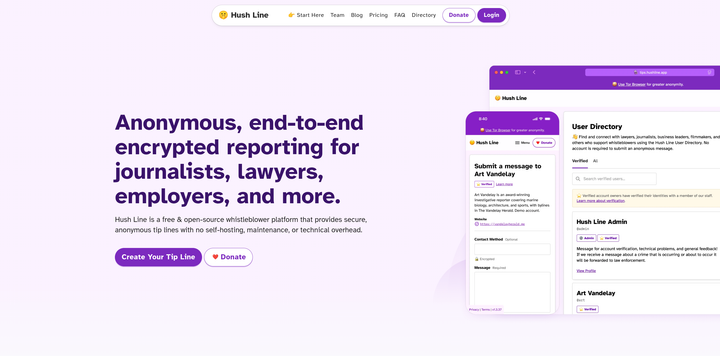
Hush Line claims to solve this usability problem by designing themselves with beginner users in mind. Unlike most tip lines, they are a text-based platform that is meant to facilitate first-contact with a suitable lawyer or newsroom.
Although Hush Line does not support file uploads, it instead encourages users to discover a repository of tip lines hosted on the platform. After first contact is made, both the sender and recipient can figure out a permanent communication method, such as through Signal or OnionShare.
Is this a dealbreaker? Not particularly. To avoid malware, you should never accept any files in your tip line without vetting the source. Hush Line emphasizes this security model to prevent its mostly non-technical users from accidentally installing malware. While other alternatives support file uploads, you should think twice before accepting potentially malicious files anyways.
For example, lets say that Johnny wants Sally to send her sensitive work files over OnionShare or Signal. He writes down basic instructions on his Hush line profile, allowing Sally to follow along without being confused by existing online documentation. When contact is made over these platforms, Johnny can now verify her identity before files are uploaded. If this contact information was published on his social media profiles without an intermediary, Sally could fail to make first contact or do so in a manner that compromises her anonymity.
Speaking of anonymity, Hush Line does support the Tor Network and self-hosted options if needed.
In this review, I will go over the pros and cons of using Hush Line compared to existing tip lines out there. Additionally, I will also go over my experience setting up and configuring Hush Line that works best for your workflow.
Lets get into it! But first, who are the backers of this project?
Who are the backers of Hush Line?
Science and Design Inc. is the nonprofit organization developing Hush Line and maintaining its servers. In 2023, it was founded by Glenn Sorrentino, a former Big Tech product manager who wanted to build software geared towards online free speech and social impact.
Sorrentino first started his Hush Line journey by demonstrating a prototype running on a Raspberry Pi server at DefCon. After catching significant attention, he later developed Hush Line into the whistleblowing platform that it is today.
According to the official Hush Line directory, it is currently used by organizations like Distributed Denial of Secrets, NPR, LA Times, Bloomberg, HuffPost, ABC News, and BBC.
Hush Line has received an independent security audit from Subgraph, a Montreal-based cybersecurity company sponsored by Open Tech Fund's Security Lab. You can read the report here.
Creating your first Hush Line tip line
Using Tor Browser
Hush Line recommends Tor Browser when registering your account. Mullvad Browser was used in this review for demonstrative purposes only.
To create your first Hush Line tip line, start by navigating to their official website to register an account. If you are using Tor Browser, please click here instead.

Clicking on Login will redirect you to a series of warnings. Please read through them carefully as they contain practical safety advice that you must follow. Click on Next to proceed.

So far, I appreciate that Hush Line includes these warnings for potential leakers. You should not use a work device to disclose sensitive information in the first place. There has been documented instances of employees being caught by their employers for attempting this. As always, lawyers should be the first option for these people to avoid any legal implications of whistleblowing.

I also like how they encourage the Tor Browser for new users. I will proceed with the clearnet version of Hush Line. However, I strongly urge you to create your account using the Onion address if possible.

Oh and as always, make sure to support free and open source projects like Hush Line!
Anyways, you should then see this login screen after continuing past these prompts.

Click Register here to create your account. Make sure to create a strong password. Hush Line requires you to use one that is at least 18 characters or more. Privacy Guides recommend using a reliable password manager like Proton Pass, 1Password, or KeePassXC to automatically generate your credentials.
Password Security
Make sure you note your unique, long, and complex password and username in a safe place. Due to the nature of end-to-end encryption, if you lose your username or password, there will be no account recovery possible and all your files will be lost.
After this is done, you should see this screen prompting you to choose a plan. For the purposes of this review, we will select Free/Core.

If account registration is successful, you will be redirected to your inbox, which contains all of your waiting, accepted, declined, and archived messages. For new accounts, your inbox should be empty.

Congratulations! You have created your account.
Optimal profile settings
Profile information

Before your tip line can receive messages, you must first configure your Hush Line account. Click on your profile username on the top right corner to open a dropdown menu, and then open Settings.
You are now on Profile settings. Here, you can update your display name, show your tip line on the public Hush line directory, add a short biography, and add links to your social media accounts.
There aren't much settings to configure besides those under Profile Details. For reasons I will discuss later, you should avoid including your contact information here to reduce public exposure.
Two-factor authentication

Securing your Hush Line account is an obvious next step here. On the left sidebar, navigate to Authentication. You should see a QR code that will prompt you to scan it with a TOTP authentication app such as Ente Auth or Aegis Authenticator. To complete the process, enter the codes from your preferred authenticator into the entry field and login to your account again.
Although TOTP is much better than using SMS or email authentication, there has been documented attacks against this method. Hopefully, Hush Line will consider supporting passkey authentication, such as a Yubikey, in the near-future.
Uploading an OpenPGP public key

Next, lets head over to the Encryption settings.
Hush Line requires users to upload a OpenPGP public key before their tip lines can receive messages. Generally, there are two methods to do this: entering a Proton email address or manually creating a OpenPGP key.
Proton Mail is a great option if you already have an account dedicated entirely for work-related purposes. Hush Line can simply retrieve the public key from Proton's servers without manual configuration on your end. I assume that most people will take this option because of this.
If you have a work email address or a self-hosted email address with a custom domain, you need to generate a OpenPGP key. The steps vary depending on your email client; make sure to double-check the official documentation to get the exact steps of doing so. I personally use my work email address with Thunderbird - an open source email client developed by Mozilla. You can follow these instructions if you also have Thunderbird.
Once that is finished, don't forget to copy and paste your public key into the text box. Then, click Upload. You'll know that you are done once the Message Statuses setting appears on the left toolbar.
Customizing your message statuses

In Message Statuses, Hush Line has a neat feature that allows you to send a reply text to a sender depending on the status of their tip. By default, all messages are considered "Waiting" by Hush Line until you choose to label them as "Accepted", "Declined", or "Archived". Once the sender checks back on the status of their tip, they could receive detailed instructions on how to proceed with first contact.
I imagine that most people would want to include their contact information under the "Accepted" category. That way, you can avoid sharing your Signal username or OnionShare link to an untrusted person online. Although this is completely optional, you may encounter an unfortunate situation where a sender forgets to include a contact method in their initial message. Making it so you only share your contact information for accepted messages is a potential compromise in this situation.
Notifications

Hush Line relies on RiseUp to forward notifications towards your inbox — an email provider that Privacy Guides does not officially recommend. By default, message content is not included in the email, but can be configured to include an encrypted body entirely. These email notifications are end-to-end encrypted so long as your address is associated with the OpenPGP public key you have previously uploaded to Hush Line.
If this workflow works for your threat model, please enable Tip Notifications, Include Message Contents, and Encrypt Entire Body.
Deleting your account

In Advanced, you have the option to delete your Hush Line account at anytime. Since Hush Line is an online platform, you may want to delete your account if it is not actively being used.
User experience
Advertising your tip line
After configuring your Hush Line profile settings, it is time to start receiving messages. To do this, you will need to share your public tip line.
On the toolbar, go to Profile.

Copy and paste the URL in your browser's address bar into your social media accounts, personal website, or email signature. Every time a message sent, Hush Line sends you email notifications. Ensure that you login regularly to approve the messages that you want to follow up on.
Sending messages
What does Hush Line look like from the perspective of a sender? I decided to test that out by sending a message to myself.

After sending the tip, Hush Line gave me a Reply Address so I can check my submission status. Lets see what happens when I click on the link!

Interesting. So, my "Waiting" reply text has appeared in this box. Since I won't be notified whether the status will change, I should definitely write down the Reply Address somewhere safe and check it periodically.
Receiving messages
Right after I sent myself a tip, Thunderbird notified me that I got a message from Hush Line.

Since the message included a Signal username, I don't technically need to login to Hush Line to continue the conversation. However, you may encounter several messages with no contact information. Lets go over what that process looks like so the sender can reach out to you instead, provided that your contact information is included within your "Accepted" reply text.
After logging into my account, I immediately spotted that my inbox is populated with a new message.

Clicking on it brought me to an encrypted version of what was sent to my email address. Since this tip can only be decrypted in my Thunderbird client, I feel much more safer knowing that Hush Line or a potential hacker cannot read the contents of my inbox.

By setting the above message status to "Accepted", the sender can see the new reply text after revisiting the reply address they saved earlier.

What happens next depends on your preferred contact method. As always, make sure to verify the identity of the source you are contacting before exchanging confidential information or files.
Self-hosting

Self-hosting your own instance of Hush Line is also a possibility. Based on my own experience, this method is not as documented compared to the Hush Line platform itself. There are generally two approaches to this: deploying a docker container into a dedicated mini-pc or purchasing a Personal Server from Science and Design's merchandise store.
Just about anyone can deploy Hush Line from a Docker container from the official GitHub repository. However, there is limited official documentation on this method. Based on my conversation with Glenn, there should not be anything preventing you from doing this step yourself if you are familiar with Docker. Note that you will be running a development build of Hush Line, meaning that you are 100% responsible for setup and troubleshooting.
By following these instructions, I was able to clone the repository into my Raspberry Pi and Macbook, enabling me to host my own version of the Hush Line website on the Tor Network. Unlike the Hush Line platform, the self-hosted instance is limited to generating a unique, shareable Onion address. Besides the initial configuration and the Onion address requirement, I encountered no substantial differences between the self-hosted and platform-based versions.
In contrast, Hush Line provides Personal Server owners with documentation and enhanced customer support. The Personal Server currently retails for $500, but you may benefit from not relying on Hush Line's servers.
There are a few notes on the unit that you should know about. The Personal Server requires an active Ethernet cable connection and a separate USB C power adapter. It functions entirely on the Tor Network, meaning that you cannot use the clearnet website when sharing your profile link to the public.
Glenn was kind enough to lend me a Personal Server to test for ourselves, but unfortunately, I encountered technical issues with the unit we received, where the display appeared to be damaged during shipping. He spent a lot of time troubleshooting the issue with me, and offered to send us a replacement, but at that point our timeline for this article would not have allowed us to give the Personal Server a proper review in time.
The feature-set of the Personal Server is almost identical to the hosted version of Hush Line I tested above, and the problem we encountered is an exceedingly rare one. I have no doubt that those purchasing the Personal Server would receive excellent support from the Hush Line team in the event of any issues, and we may explore taking another look at their self-hosted platform in the future.
Risks of file uploads
Regardless of the whistleblowing software, you should always compartmentalize your device. Never use a personal device for this purpose.
Compartmentalization could take the form of purchasing a dedicated work computer or installing a virtual machine that can isolate dangerous files from your host operating system. Depending on your computer's specifications, you can even use a Linux operating system QubesOS or Whonix.
Still planning on receiving files from a source? DangerZone can sanitize PDFs into a safe format, reducing the risk of installing malware. This works best in tandem with QubesOS and Whonix, which reduce your chances of obtaining malware.
Final verdict
After using their platform for the past few weeks, I can comfortably write that Hush Line accomplishes its mission astoundingly well. Not only is customer support excellent for enterprise users, but its integration with PGP encrypted email makes it a lifesaver for a Thunderbird user like me. The ability to receive encrypted notifications via email is honestly an underrated feature.
The best feature of Hush Line for me is that there is no need to visit your profile regularly. Assuming that you correctly configured your Notifications settings, you can receive the content information directly into your inbox without the risk of malicious attachments or files.
I also enjoyed seeing the public directory even if it is optional. The first issue many whistleblowers face would be finding the correct person to talk to first. Not only are journalists present, but also nonprofit organizations and lawyers knowledgeable about common whistleblowing issues. Emphasizing the later is a good sign as they should be the first line of defense against workforce retaliation.
For those searching for a dropbox platform, you should consider another solution. Hush Line functions primarily as a first-contact service, allowing you to verify sources without compromising your computer. Other whistleblowing platforms do support file uploads, but you should always ensure that you take precautions to air-gap the device hosting your dropbox. There is nothing preventing Hush Line from being complemented with a anonymous file sharing service though.
I also wish there is better documentation for self-hosting Hush Line. Even if this is somewhat outside the target demographic here, an official guide on deploying a self-hosted instance via Docker would be an excellent addition to the website.
All in all, I highly recommend Hush Line if you are looking for a no-frills and inexpensive tip line for your personal or enterprise workflow. Don't forget to pair it with Signal or OnionShare!
Support Hush Line
If you wish to support this free and open-source project, you can help Hush Line by:
Community Discussion